
YOUR SAUNA LOG
Keep track of
your sauna sessions.
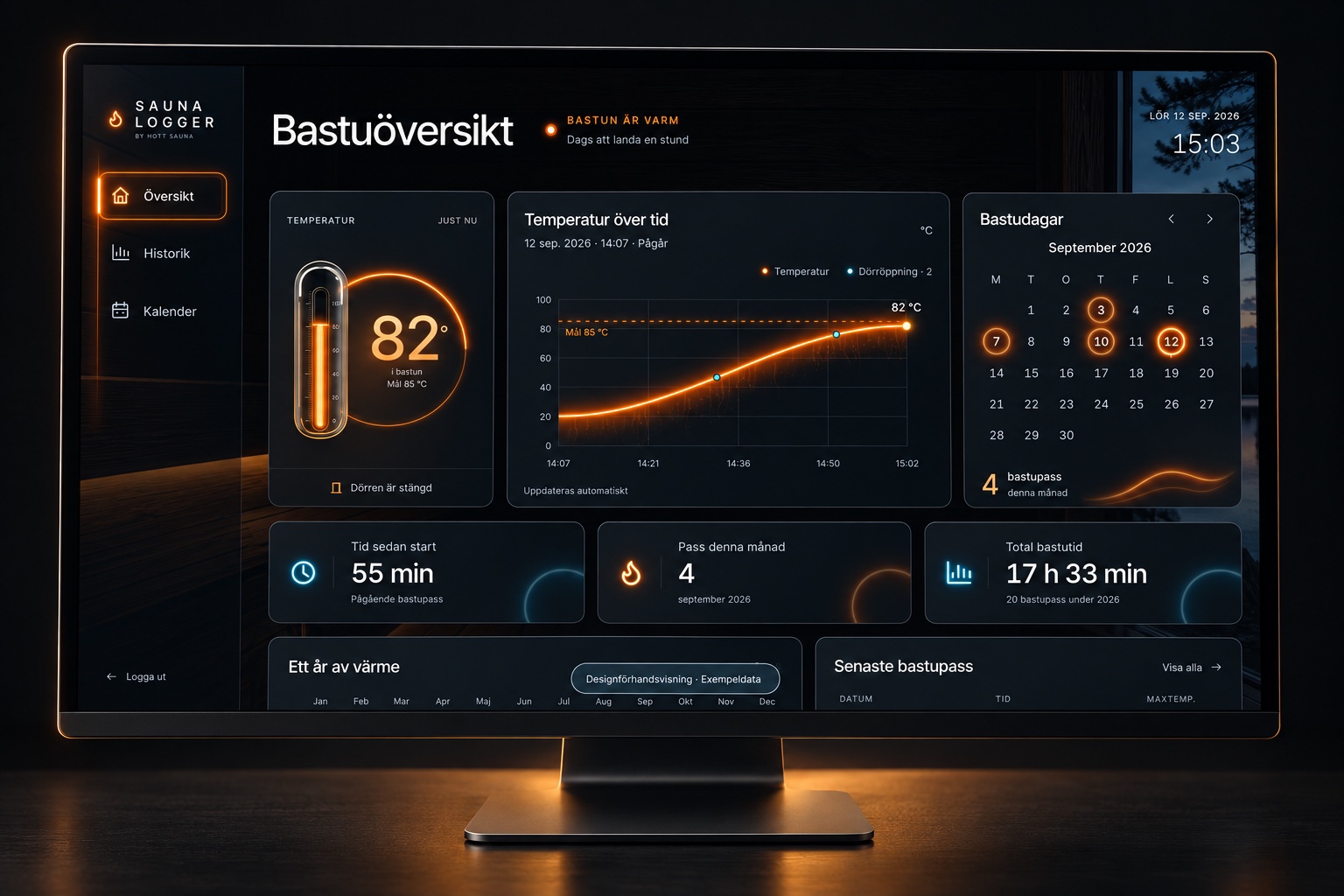
Log each sauna session with a tap or the timer, see your sauna days in the calendar and follow your statistics. Join friends in clubs with leaderboards. With a compatible Wi-Fi heater, sessions are logged automatically, including temperature curves.
Manually or with the timer · Automatically with Harvia & HUUM Wi-Fi

WHAT YOU GET
An overview of
your sauna activity.
Log a session with a tap, or start the timer and stop it when you finish. Each session records the time, duration and temperature. The calendar shows your sauna days, statistics show your session count and total sauna time, and clubs let you follow your friends’ activity.
01 TEMPERATURE
Follow the temperature
throughout your session.
The curve shows how the temperature changes from the start of heating. See how close the sauna is to its target temperature and when the door was opened. The same detailed view is available for past sessions.
- Current temperature and your target
- Door openings along the temperature curve
- The whole session saved, from start to finish
Temperature over time
02 SAUNA ROUTINE
See how often
you use the sauna.
The calendar shows which days the sauna was used. The yearly overview makes it easy to see how usage varies between weeks and months. Each marked day opens the session and its measurements.
A year of warmth
Find a session in the calendar.Choose a sauna day to view its session curve.
See your total sauna time.Review session durations and counts.
03 EXTRA FOR WI-FI HEATERS · BETA
With a Wi-Fi heater,
sessions log themselves.
You can log sessions manually. If you have a Harvia or HUUM heater with Wi-Fi, connect your account in Settings to record the start, end and temperature curve automatically.
- 01
Connect your heater once
Sign in with your Harvia or HUUM account in Settings. Your password is stored encrypted.
- 02
Use the sauna as usual
A session starts automatically when the heater starts warming up. Temperature, target and door openings are recorded while you sauna.
- 03
Open the session in your history
See the start and end times, duration and maximum temperature. Select the session to open its temperature curve.
Harvia Xenio WiFi and HUUMMore brands are planned. Without a Wi-Fi heater, log sessions manually or with the timer.
GOOD TO KNOW
Using SaunaLogger.
What do I need to use SaunaLogger?
Just an account, which is free. Log sessions manually or with the timer, in your browser or the app. You can sign in from this page.
Do I have to log my sauna sessions myself?
You can log with a tap or use the timer. If you have a Harvia or HUUM heater with Wi-Fi, connect it to record sessions automatically, including temperature, time and door openings, without starting or stopping the log yourself.
Can I control the sauna from the app?
SaunaLogger displays and records what happens in your sauna. Start the heater and adjust its settings using your usual sauna controls.
Can I create an account here?
Yes. Select Get started, enter your name, @username and email, and we’ll send you a sign-in link. No password needed.
GET STARTED
Start logging your sauna sessions today.
Create an account, log your first session and invite friends to a club.
Free · Web and iPhone